

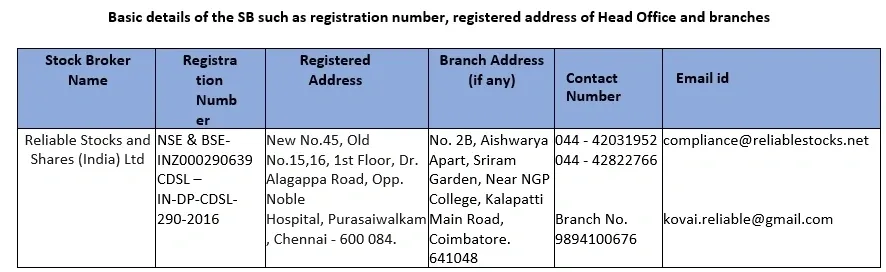
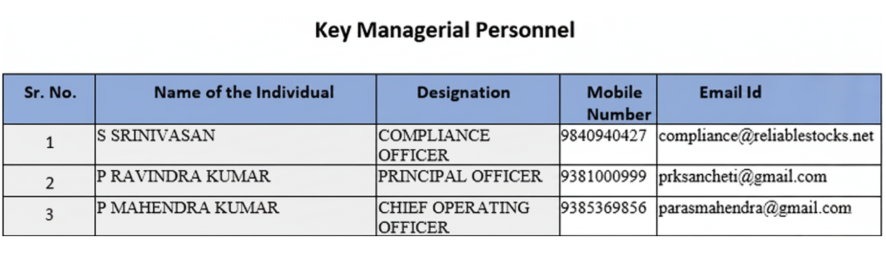

In absence of response/complaint not addressed to your satisfaction, you may lodge a complaint with
| NSE | Visit NSE Investor Helpline |
| BSE | Visit BSE Complaints |
| CDSL | Visit CDSL Grievances |
| SEBI | Visit SEBI SCORES |
| MCX | Visit MCX Investor Services |
| NCDEX | Visit NCDEX Complaints |
| NSDL | Visit NSDL Complaints |
* Mandatory details for filing complaints on SCORES: Name, PAN, Address, Mobile Number, Email ID . Please quote your Service Ticket/Complaint Ref No. while raising your complaint at SEBI SCORES/Exchange portal
1. In absence of response/complaint not addressed to your satisfaction, you may lodge a complaint with
2. Given Link for SMART ODR PORTAL investor grievance redressal by enabling investors to access Online Dispute Resolution Institutions for the resolution of their complaints. hyperlink: smartodr.in
3. Step by step procedures for opening an account, filing a complaint on designated email id, and finding out the status of the complaint etc.
Below is the detailed write up on procedure for filing a complaint on designated email id, Phone number and procedure for finding out status of the complaint basis Ticket Number:
How to create a ticket or raise a complaint at Reliable Stocks? A complaint can be raised by creating a ticket on Reliable Stocks support portal. To create a ticket, follow these steps:
Support Portal
- Go to www.reliablestocks.net/support
- Enter your Mobile No and fill up the captcha, then submit.
- It will navigate to the support system, click Create Ticket and fill in the required details.
- Enter the query details under Describe your issue in detail.
- Click on Choose file if you need to attach a file.
- Customers will receive an email acknowledgement on their registered email ID with the Ticket number.
Voice Support
Customers can call the Helpline numbers:
+91 98409 40427 | 044 - 42031952
Once you sign up, you will have complete access to our self-service portal and can use your account to raise support tickets and track their status.
How to Track Complaints or Tickets at Reliable Stocks?
Reliable Stocks account holders can track complaints or tickets by following these steps:
- Visit reliablestocks.net/support
- Log in with your client credentials, then submit.
- Click on the ticket that needs to be tracked.
To Reopen a Ticket:
- Click on the ticket that is to be reopened.
- Click on Reopen Ticket.
- Enter your response.
- Click on Reply.
Voluntarily Freeze or Block Online Trading Account
Reliable Stocks clients can voluntarily freeze or block their online trading account access to prevent unauthorized activity. This policy can be initiated via:
- Email: stoptrade@reliablestocks.net
- Support Portal: reliablestocks.net/clientmanagement/login/
- Customer Service: 044-42031952 (from the registered mobile number)
Note: Once blocked, clients will be unable to log in to the BOW Terminal.
Close Trading and Demat Account Online
Reliable Stocks clients can close their trading and demat account online by logging in to the website, navigating to their profile, and initiating the account closure request. The closure will be processed within a few working days after confirmation.
Steps to Close Account:
- Log in to your Reliable Stocks account: reliablestocks.net/index.php
- Use your registered Client ID and Password to access the Web Portal.
- Navigate to Client Login Tab and follow the closure instructions.
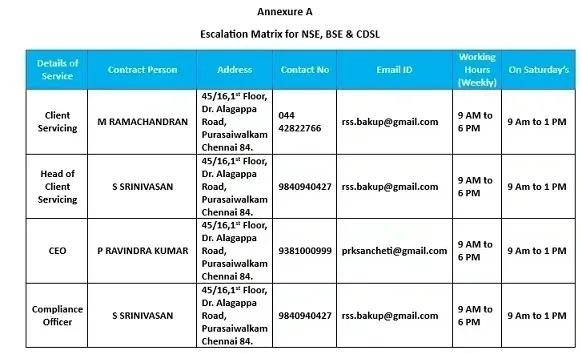
CONTACT US
HEAD OFFICE
Better yet, see us in person!
We love our customers, so feel free to visit during normal business hours.
RELIABLE STOCKS AND SHARES (INDIA) LTD
Contact No: 98409 40427, 98843 95856
Landline: 044 - 42031952, 044 - 42822766
Email (Compliance): compliance@reliablestocks.net
Email (Support): rss.bakup@gmail.com
Our Location
Contact
RELIABLE STOCKS AND SHARES (INDIA) LTD
Corporate office & Registered Office
New No.45, Old No.15,16, 1st Floor, Dr. Alagappa Road, Opp. Noble Hospital, Purasaiwalkam, Chennai - 600 084.
Hours
Mon – Fri: 09:00 AM – 05:00 PM
Sat – Sun: Closed
Inquiry
